Meridian VR Warehouse Digital Twin
3PL customers explore their own stock and orders in a 3D model of the warehouse
- VR / 3D
- Data & Analytics
- Client
- VNE Tech Solutions
- Sector
- Supply chain & logistics
- Year
- 2026
- Platforms
- Windows · VR headset
- Stage
- Prototype
The project at a glance.
Meridian is a digital twin for third-party logistics (3PL) warehouses: a 3D model of each site that the 3PL's customers can fly over, walk through and filter, each seeing only their own stock and orders. It is built in Unity for PC virtual-reality headsets, with a point-and-click portal so the same experience can be demonstrated on an ordinary laptop. The working prototype runs on a simulated network of four warehouses, and a detailed product blueprint sets out the path to live warehouse data and an AI analyst.
- Who it serves
- 3PL customers (brand owners)Their own stock, orders and exceptions across every site, shown on the warehouse itself rather than in a report.
- Warehouse operatorsOne twin across all customers, with heatmaps, a live KPI board and red beacons over pallets holding up late orders.
- Account managers and sales teamsA laptop demo with a point-and-click portal and clickable pallets, ready to show before any headset is involved.
Warehouse customers get stock reports, not a view of the floor
A third-party logistics (3PL) provider stores and ships goods for many brands under one roof. Those brands keep asking the same questions: where is my stock, are my orders on time, what arrived today? The answers usually come back as stock reports and exports, which give the numbers but little sense of what is actually happening in the building.
Any view a customer can use also has hard constraints. Competing brands share the same racking, so each must see its own data and nothing else. And it has to work on the hardware people actually have: a laptop in a customer meeting today, a VR headset for site reviews and hand tracking later, without the product being rebuilt for each.
Pick a lens, and the warehouse becomes the report
VNE started with a four-part product blueprint covering UX, modules, technical architecture and a ten-phase roadmap, then built a working Unity prototype that covers much of the first two phases: the 3D warehouse foundation and the customer twin. A customer session opens on the Meridian portal. The customer picks a lens such as 'Slow movers' or 'Dead stock', enters a 3D model of the site, and sees the matching pallets stay lit while everything else fades back.
Behind it sits a simulated network of four warehouses and five fictional customer brands, with a running operation: orders are allocated, picked, packed and dispatched, and deliveries are docked and put away by forklift. Every view gets its data through one service interface, which scopes cards, orders, KPIs, heatmaps, filters and reports to the customer in session. It is designed so that a connection to a live warehouse system can later replace the simulation without changing the experience.
What it does.
Customer portal with lenses
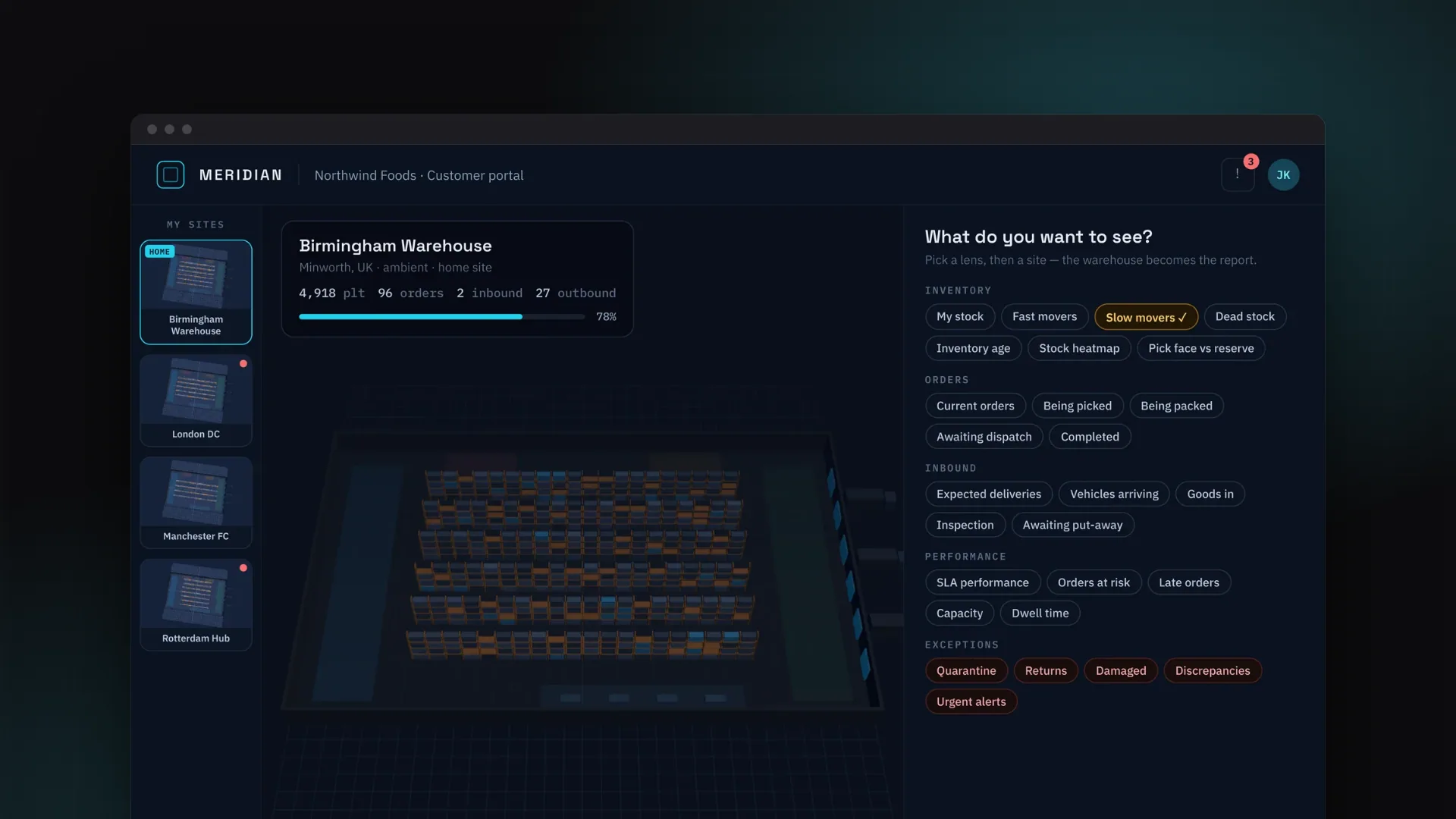
The Meridian portal shows the customer's sites, the active site's numbers and a 'What do you want to see?' panel of lens chips. A lens chosen here stays on when the customer enters the 3D twin.
Three ways to move around
Switch instantly between a network view of all four warehouses, a bird's-eye floor plan and first-person on the floor. Look at any spot and teleport there, including from a live 1:50 tabletop miniature.
Eleven stock filters and SKU focus
Fast movers, slow movers, dead stock, inbound today, quarantine, returns, awaiting dispatch and more. Matching pallets keep their status colours while the rest dim, and the most-picked SKUs can be singled out.
Heatmaps on the warehouse itself
Five layers colour the stock directly: pick frequency, inventory age, ABC class, expiry risk and rack occupancy. A sixth draws live congestion on the floor where people and forklifts move.
Information cards and order journeys
Cards for pallets, locations, racks, orders, workers, forklifts, docks, pack benches, zones, deliveries and sites. From a reserved pallet, an order or a picker, the order's route through the building can be drawn with labelled stops.
A warehouse that moves
Pickers walk the aisles with trolleys, benches pack orders, trailers dock and wait at the doors, and forklifts put deliveries away. The simulation can be paused or run at up to eight times normal speed.
Beacons for late orders
Pulsing red pillars mark every pallet waiting on an order that has missed its cut-off, and that order's dispatch door, alongside a live KPI board.
Each customer sees only their data
In a customer session, cards, orders, KPIs, heatmaps, filters and reports are scoped to that customer. Other brands' stock appears only as grey shapes, and the lens cannot be switched to anyone else.
Saved views and reports
Save the current site, filter and view mode as a named view that is kept between sessions, or create a plain-text report of the current view, scoped to the customer.
See it in action.
Meridian runs in a VR headset or the Unity editor, so this gallery shows the product's design prototype alongside technical visuals generated from the prototype's own data layer. Each caption says which is which.
How a customer explores their stock
- 01
Open the portal
A customer session opens on the Meridian dashboard with the customer's home site selected and their numbers for every site.
- 02
Choose a lens
Pick a question, such as slow movers, dead stock, quarantine or awaiting dispatch, or switch on the inventory-age heatmap.
- 03
Enter the twin
The portal folds into a slim top bar that shows the site, the active lens and how many pallets it lights, over a bird's-eye view.
- 04
Drill in
Teleport to the floor, click a pallet to open its card, or follow a reserved pallet's order through picking, packing and dispatch.
- 05
Keep the answer
Save the view for next time, or create a report of the current filter that contains only the customer's own data.
How it's built.
Meridian keeps three things apart: what the warehouse contains (the data), what people see and click (the experience) and what they hold in their hands (the device). Each is designed to change without breaking the others, which is how a laptop demo can grow into a headset product, and a simulated warehouse into a live one.
Technically, it is a Unity 6 application using OpenXR, the XR Interaction Toolkit and the Universal Render Pipeline, split into six runtime assemblies whose references the compiler enforces. The domain model, seeded generator and activity simulator are plain C# with no engine references. A single ITwinService interface serves cards, KPIs, heatmaps, filters, saved views and reports, and the implementation behind it applies the customer session scope. Twin.Interaction turns devices into semantic commands, and the view layer draws racking and pallets with GPU instancing, using a spatial index for picking instead of an object per pallet.
- Customer on a laptopMeridian screen portal, mouse and keyboard
- VR userHTC Vive Pro 2 via SteamVR and OpenXR (configured, awaiting headset testing)
- XR Device SimulatorHeadset-free testing in the Unity editor
- Meridian screen portalClickable uGUI dashboard with sites, lenses and saved views
- 3D twin viewsNetwork, bird's-eye, first-person and a 1:50 tabletop miniature
- ModulesInspection, heatmaps, customer lens, navigation, menu, help
- Twin.Interaction16 semantic commands and a command router; the only assembly that touches devices
- TargetingGaze and mouse picking against a spatial index of instanced pallets
- ITwinServiceOne gateway for queries, cards, KPIs and reports; applies the session scope
- MockTwinServiceFour sites, each with its own generator seed and live simulator
- Twin.DomainPlain C# model of zones, racks, pallets, orders, deliveries, workers and forklifts
- WMS / ERP adaptersReplace the mock behind ITwinService; Dynamics 365 F&O recommended among the first two
- AI AnalystVoice and text questions answered by an agent whose tools are scoped to the customer
- Server-side tenancyCustomer scoping enforced on the server, never in the headset
Technology
Frontend
- Unity 6
- C#
- Universal Render Pipeline 17
- uGUI 2
- GPU instancing
Data
- Plain C# domain model
- Seeded synthetic warehouse generator
- Tick-based activity simulator
- Saved views in PlayerPrefs
AI & ML
- AI-generated textures
- Flux and Ideogram image models
- Python (NumPy, Pillow) texture tooling
Integrations & APIs
- OpenXR 1.12
- XR Interaction Toolkit 3
- XR Plug-in Management 4.5
- Input System 1.8
- SteamVR runtime
- HTC Vive controller profile
Auth & Security
- Service-layer customer scoping
Testing & Quality
- In-editor data self-test
- Assembly definition boundaries
- XR Device Simulator
The hard parts, solved.
- 01
Designed for a VR frame budget
A headset needs the scene redrawn about 90 times a second, so one game object per pallet was ruled out from the start. Racking and pallets are drawn with GPU instancing in batches of up to 1,023, grouped into colour buckets so no custom shader is needed. Instanced pallets have no colliders, so a spatial index of bounding boxes lets gaze and mouse clicks still pick out a single pallet. Measuring the frame rate on the headset itself comes next.
- 02
Hardware independence enforced by the compiler
Business features never refer to a mouse, controller or hand. They respond to semantic commands such as Select, Inspect, Teleport and Back, raised by whichever device is in use. Assembly definitions make this structural: only Twin.Interaction may reference the XR Interaction Toolkit or the Input System, and the domain and service layers cannot reference Unity at all. The same command router is the planned entry point for voice and AI input.
- 03
Customer scoping enforced by the service layer
Scoping happens in the service layer rather than in each view. In a customer session, requests for another brand's pallet, order or delivery card return nothing, heatmaps and filters cover only the customer's own stock, the lens is locked and reports are scoped. In the prototype this runs in-process; the blueprint requires the same rule to be enforced on the server once live data arrives, so a customer's headset never receives another customer's data.
- 04
A realistic warehouse without real data
A seeded generator builds each site's zones, racks and 300 SKUs, pallets with lot codes, expiry dates where relevant and movement history, plus orders and deliveries; ABC classes are then derived from pick volumes. A tick-based simulator runs the operation: pickers route along a corridor network, forklifts put deliveries away, and congestion builds up and fades on a floor grid. The same seed and steps always produce the same warehouse, which keeps demos and tests repeatable.
- 05
Building for Unity without always having Unity
Much of the build was done away from the Unity editor, so scenes are produced by one-click editor menus rather than hand-written scene files, and the plain C# layers compile outside Unity so they can be checked without it. The art pipeline follows the same idea: AI-generated textures are made tileable and given normal maps by a Python script, and the app falls back to procedural materials if they are missing.
A customer demo that runs today in the Unity editor
Meridian runs in the Unity editor as an end-to-end customer demo on a simulated four-site network: open the portal, pick a lens, fly over the site, walk the aisles, inspect the customer's own pallets and orders, then save the view or create a report. Operator and customer scenes are each built with one click, and the data layer's built-in self-test passes.
The roadmap is just as clear about what comes next. Testing on the HTC Vive Pro 2 is the immediate step; live warehouse data, server-side tenancy and the AI Analyst are later phases, and each already has a seam in the code: the service interface, the session scope and the command router.
- Product strategy
- UX/UI design
- Software architecture
- VR & 3D development
- Data modelling