Saffron House
Online ordering and table requests that an independent restaurant can run for itself
- Website
- Web App
- eCommerce
- Client
- Concept build
- Sector
- Hospitality
- Year
- 2026
- Platforms
- Web
- Stage
- MVP
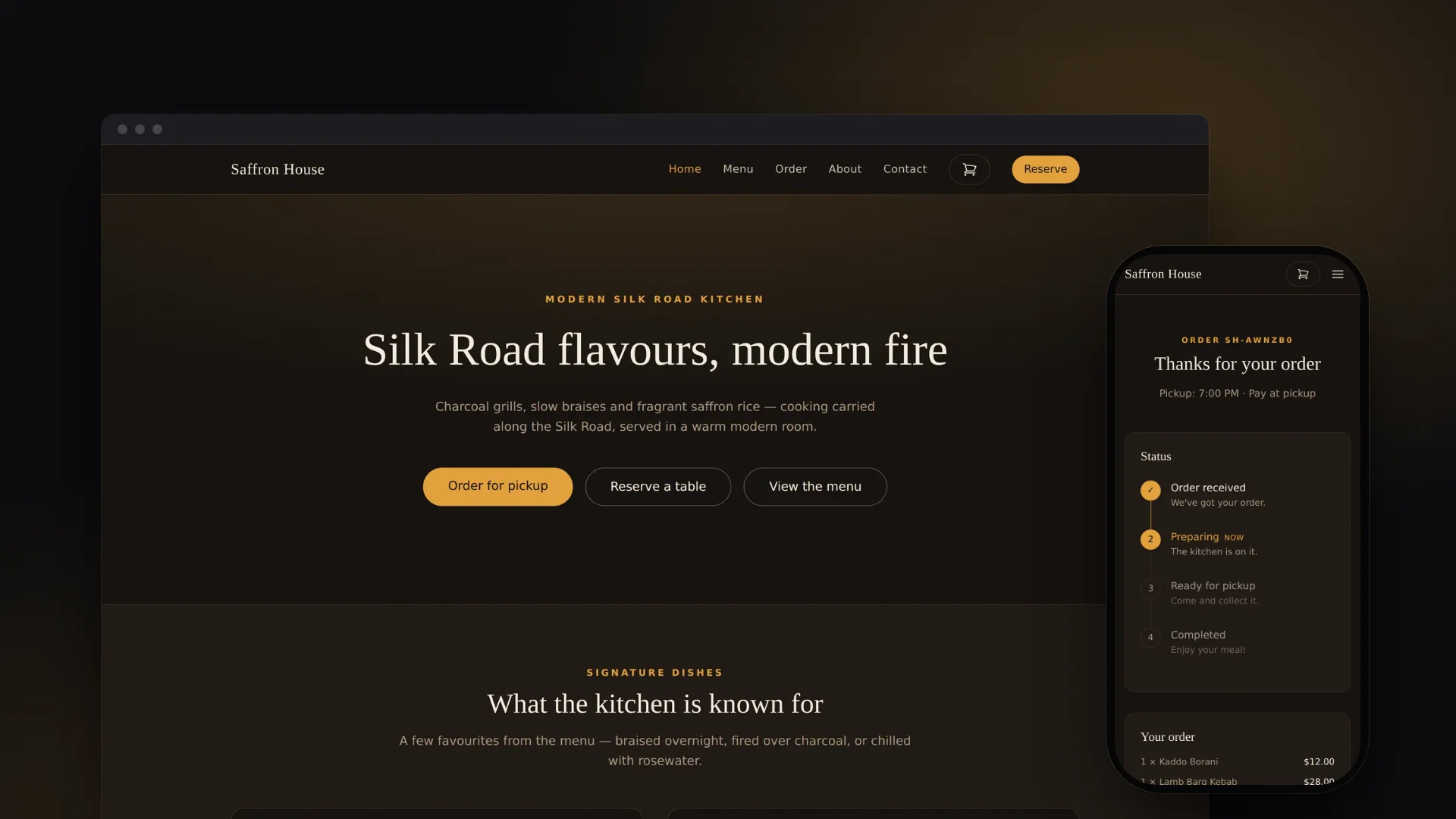
The project at a glance.
Saffron House is a working restaurant website, built as a concept to show what an independent restaurant can run for itself. Guests browse the menu, order food for collection, request a table and check how their order is getting on. Staff work through orders, bookings and messages in one back office, while the site applies the menu prices, minimum order and seat limits automatically.
- Who it serves
- GuestsA clear menu with dietary tags, quick ordering for collection, a simple table request and a page that shows how their order is getting on.
- Kitchen and front of houseOne queue of incoming orders with one-tap status changes, a reservations list and a messages inbox.
- The ownerA single application with its own database that works without any external services. Email delivery is switched on by adding a provider key and sender address.
A restaurant needs more than a brochure website
An independent restaurant's website is often little more than a menu and a phone number. Guests who want to order for collection or book a table have to ring, usually while the team is busy with service.
What a small venue needs is one place where guests can order and book for themselves, where its rules are applied every time (menu prices, a minimum order, a fixed number of seats per sitting), and where staff can see and act on everything that comes in without learning a complicated system.
A website for guests and a back office for staff
VNE designed and built Saffron House in four planned phases: the public website, a reservations and contact backend, online ordering for collection, and a password-protected back office for staff. Each phase was committed as its own increment on top of the last.
Guests browse a menu with dietary tags, fill a basket, choose a pickup time and pay when they collect. Every order gets a short reference and a status page, and table requests are held to each sitting's capacity. Staff see new orders, bookings and messages in one place and move each order from received to preparing, ready and completed.
The restaurant's name, address, opening hours, seating times and capacity, ordering rules and full menu are kept in two configuration files rather than written into the pages, so changing them does not mean editing page code.
What it does.
Menu with dietary tags
Five menu sections with jump links, prices and vegetarian, vegan, gluten-free and spicy tags. The signature dishes on the home page are drawn from the same menu data.
Ordering for collection
Guests add dishes, change quantities and see the basket count in the header. The basket is saved in the browser, so it survives a refresh, and a minimum order applies before checkout.
Short, simple checkout
Checkout asks for a name, contact details, a pickup time and any notes, and payment is taken on collection. An optional card payment route through Stripe's hosted checkout is also built in.
Order reference and status page
Each order gets a short reference that is easy to read out, such as SH-AWNZB0, and a status page with a timeline from received to completed. Any order can be looked up by its reference.
Table requests with real capacity
Every request is checked against the seats left at that sitting. When a sitting is nearly full, the guest is told how many seats remain instead of being overbooked.
Email alerts and confirmations
With an email provider connected, the restaurant is alerted to every new order, booking and message, and guests get a confirmation of their booking, message or pay-at-pickup order. Without one, emails are logged instead.
Kitchen order queue
Active orders show their items, pickup time, payment and notes. One tap sets an order to Preparing, Ready or Completed, or cancels it, and the guest's status page reflects the change.
Reservations desk and inbox
Staff confirm, cancel or restore bookings, and cancelling frees those seats straight away. Messages from the contact form land in a simple inbox.
Password-protected back office
The staff area stays locked until an admin password is set. Sign-in attempts are rate-limited, and a successful sign-in starts a signed session that expires after eight hours.
See it in action.
Screens captured from the working application using fictional demo data.
How a collection order flows
- 01
Guest fills a basket
The basket is kept in the browser and holds only dish IDs and quantities. The prices a guest sees there are for display only.
- 02
Server re-prices and saves
The server re-checks the details with the same rules as the form, prices every line from the menu, applies the minimum order and saves the order, its lines and a new reference in one step.
- 03
Restaurant and guest are told
The restaurant gets an order alert and a pay-at-pickup guest gets a confirmation, or both are logged if no email provider is connected.
- 04
Kitchen works the queue
Staff move the order through Preparing, Ready and Completed from the order queue in the back office.
- 05
Guest checks progress
The status page reads the same order record, so the guest sees the latest step whenever they open or refresh it.
How it's built.
Guests and staff use one web application, with the staff pages behind a password. When a guest orders or books, the server checks the request, applies the restaurant's rules, saves it to a small database file and sends the emails, or logs them if no email provider is connected. Staff pages read the same database, so staff and guests always see the same record.
Technically, it is a Next.js 15 App Router project in TypeScript. Most public pages are pre-rendered at build time, with React 19 client components for the basket and forms, while the order status page and the staff pages are rendered on each request. Seven route handlers take form submissions and staff actions, and the public ones validate every request with zod schemas shared with the browser forms. Storage is SQLite through better-sqlite3, kept behind one data-access module to keep a later move to Postgres small. Email (Resend) and card payments (Stripe Checkout) are optional and called directly over their REST APIs. Deployment is configured for Railway as a multi-stage Docker image, with a persistent volume required for the database.
- Public website10 App Router pages; Tailwind CSS 4; responsive header with mobile menu
- BasketReact context saved to localStorage; dish IDs and quantities only
- Staff area5 pages under /admin, rendered on request; excluded from search indexing
- Public APIPOST orders, reservations and contact; zod validation and per-IP rate limits
- Staff APISign-in, sign-out, order status and reservation status; status changes check the session
- Session authHMAC-SHA256 signed, httpOnly cookie with an 8-hour expiry
- PricingRe-prices every line from the menu in whole cents; minimum order enforced
- CapacitySeats per sitting counted and booked in one transaction
- Venue contentlib/site.ts and lib/menu.ts hold identity, hours, rules and the menu
- SQLitebetter-sqlite3 in WAL mode; 4 tables created on first use
- Data-access layerlib/db.ts is the only module that opens the database
- ResendOptional email; messages logged when not configured
- Stripe CheckoutOptional hosted card payment, confirmed on return; not yet tested with Stripe
- RailwayConfig for a Node 22 multi-stage Docker image with a health check; database volume required
Technology
Frontend
- Next.js 15 (App Router)
- React 19
- TypeScript 5 (strict)
- Tailwind CSS 4
Backend
- Next.js route handlers (Node.js)
- Node.js 22
- zod 3 (shared schemas)
Data
- SQLite via better-sqlite3 11 (WAL mode)
- Browser localStorage for the basket
Integrations & APIs
- Resend email API (optional)
- Stripe Checkout REST API (optional)
Auth & Security
- HMAC-SHA256 signed session cookie
- Constant-time comparisons
- In-memory rate limiting
- Server-side re-pricing of every order
Hosting & DevOps
- Docker multi-stage build (Node 22)
- Railway configuration
Testing & Quality
- ESLint 9 (Next.js and TypeScript rules)
- Type checks in every production build
The hard parts, solved.
- 01
Never trusting prices from the browser
The basket sends only dish IDs and quantities. The server merges duplicate lines, caps quantities, drops anything not on the menu and prices each line from the menu in whole cents before checking the minimum order. The order and its lines are written in a single transaction, and a unique reference is generated with a retry for the rare collision. In testing, an order sent with a made-up price of one cent was re-priced from the menu and refused as below the minimum.
- 02
Online bookings that cannot overbook a sitting
Each seating time has a fixed number of seats. Counting the seats already booked and saving the new request happen inside one synchronous SQLite transaction, so two guests cannot both take the last table. Cancelled bookings are left out of the count, so a cancellation frees its seats immediately, and a guest who asks for too many seats is told how many remain.
- 03
Secure staff sign-in without a user database
The back office is protected by a single password held in configuration, and stays locked until one is set. A successful sign-in issues a cookie holding an expiry time and an HMAC signature keyed on that password, so changing the password signs everyone out without a separate secret. Passwords and signatures are compared in constant time, sign-in attempts are rate-limited, and every staff page and status endpoint checks the session.
- 04
Optional email and payments that fail safely
Email and card payments are switched on by configuration. With no email provider, messages are logged and the API reports that no confirmation was sent, so the site never tells a guest to check an empty inbox. Without a Stripe key the card option is hidden and any card request is treated as pay-at-pickup. When card payment is enabled, an order whose payment cannot start is kept as unpaid rather than lost, and payment is confirmed by reading the Stripe session back when the guest returns.
- 05
Shipping a native database driver to the cloud
better-sqlite3 relies on a compiled binary. Railway's default builder picked a Node version with no prebuilt binary and the build failed, so the project ships a multi-stage Dockerfile pinned to Node 22 and keeps the driver out of the Next.js server bundle. The deployment guide makes a persistent volume mandatory so orders and bookings survive redeploys.
A concept build that can be adapted for a real venue
Phases one to four of the plan are built. For this case study the site was built and run with fictional orders, bookings and messages, and every flow shown here worked end to end, including the capacity check and an order moving from the staff queue to the guest's status page. The production build passes its type checks and linting.
It is a concept build, so the restaurant, its address and its menu are placeholder content. Railway deployment configuration is included, but no public deployment is documented. Card payments through Stripe are implemented but have not yet been tested against Stripe, and there is no automated test suite yet.
- UX/UI design
- Full-stack development
- Data modelling
- Systems integration
- DevOps