Gym Workout Log
Workout logging made for one hand and no signal, with every set backed up
- Web App
- PWA
- Client
- Personal project
- Sector
- Health & fitness
- Year
- 2026
- Platforms
- Web · Installable PWA
- Stage
- MVP
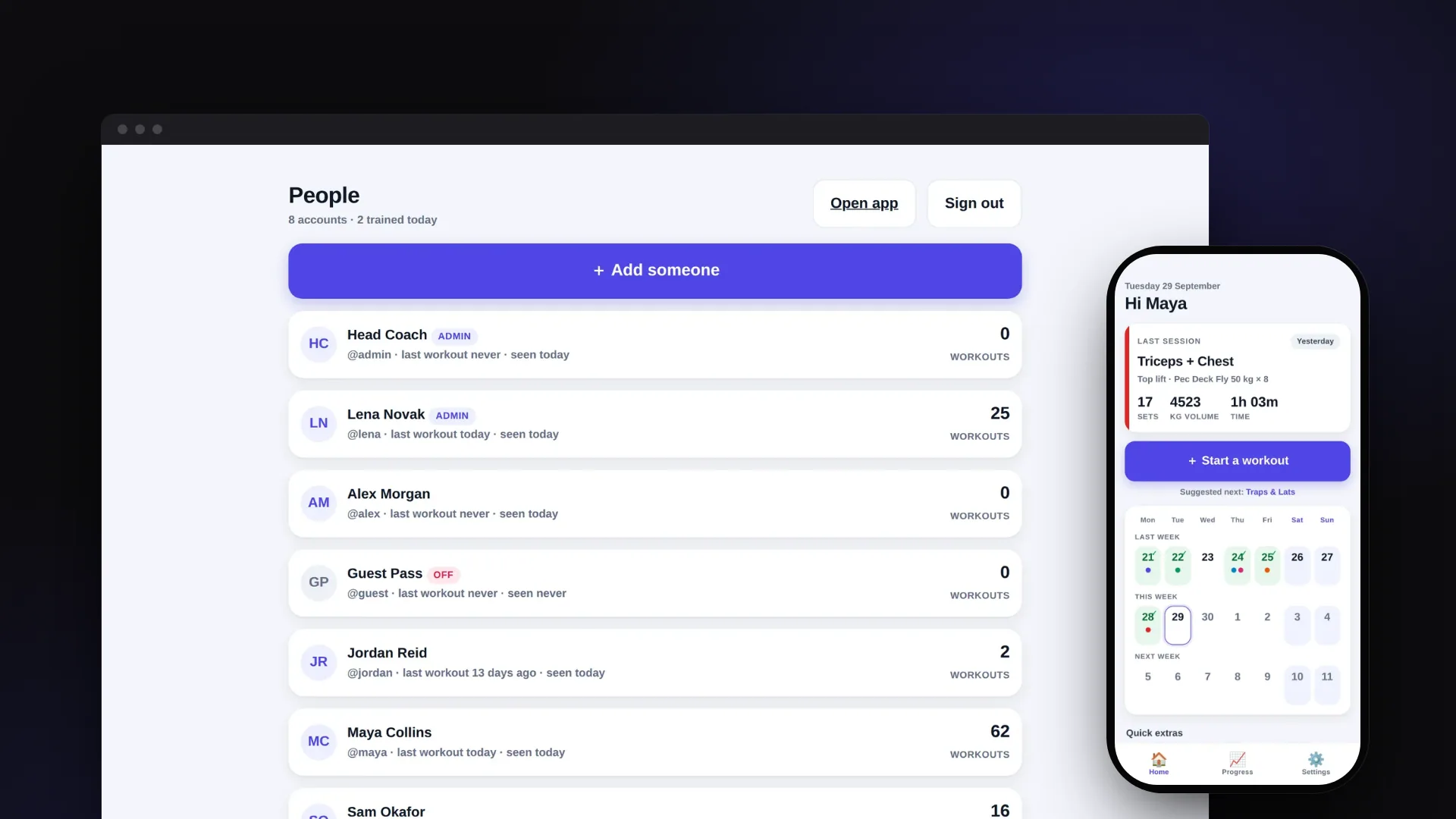
The project at a glance.
Gym is a workout log for the phone, built to be used between sets with one hand. It opens with what was lifted last time, keeps working in a gym basement with no signal, and backs every set up to the user's account, so a lost or replaced phone does not take their training history with it. A small admin site lets one person set up and look after accounts for everyone who trains.
- Who it serves
- People who trainA log that is quicker than a notebook, remembers last time, shows real progress and keeps working with no signal.
- Admin or coachOne place to add people, reset passwords, switch accounts off and see who has actually been in.
- Whoever hosts itOne small server and one database, configured for Railway, with a health check and a documented way back into a locked admin account.
Logging has to fit into the gap between sets
Mid-workout, logging a set means sweaty hands, a phone balanced on a bench and a couple of seconds of attention. A log that asks for forms, a keyboard and small buttons at that moment gets skipped, and a training history with gaps cannot show whether someone is getting stronger.
Gyms also have poor signal, especially below ground. An app that waits for the network before saving fails exactly when it is needed, and one that only saves on the phone loses the whole history when that phone is lost or replaced. Once several people share the log, each of them needs a private account, without opening a public sign-up page.
A thumb-first log that saves on the phone and syncs afterwards
VNE designed every screen around one test: can this be done in two seconds, one-handed, without reading much? Workouts open pre-filled from last time, numbers are set with large steppers and quick chips instead of a keyboard, and a rest timer takes over the screen between sets.
Behind the phone app sits a small Express server and a Postgres database. Sets are saved on the phone first and uploaded in the background, so a dead signal never costs a set, and signing in on a new phone brings the history back. A separate admin site handles the people side: adding accounts, handing out starting passwords, resetting forgotten ones and seeing who has been training.
What it does.
Starts from last time
A new workout reopens the exercises from last time for that group, with the previous top set loaded into the steppers. The keyboard only appears when naming a new exercise.
Full-screen rest timer
Presets from 30 seconds to 2 minutes, a countdown ring, beeps and vibration for the last five seconds, then a green GO screen. It keeps the screen awake and can shrink to a pill while logging continues.
Works with no signal
The app itself is cached on the phone, and every set is saved there before anything touches the network. The account card says plainly when the phone is offline and that its sets are safe.
Backed up automatically
Changes upload in the background shortly after each save, when the signal returns, when the app comes back into view and once a minute. Signing in on a new phone brings the history back.
Progress that informs the next set
Per exercise: best set, estimated one-rep max, a top-set trend line, volume per session and a four-week change. Beating a previous best flashes a New best message during logging.
Calendar and a gentle suggestion
The home screen shows last, this and next week with trained days ticked and colour-coded by muscle group. The app suggests which group comes next in the cycle but never enforces an order.
Admin-managed accounts
There is no public sign-up. An admin creates each account with a readable starting password, and the app makes the person choose their own password the first time they sign in.
Security that stays out of the way
Passwords are hashed with bcrypt, the session lives in an httpOnly cookie for 90 days, and Face ID or Touch ID can lock the app on phones that support it. A password change or a switched-off account signs out every other device.
See it in action.
Screens captured from the working application using fictional demo data.
How a logged set reaches the database
- 01
Tap Log set
The set is written to the phone's own storage straight away with a timestamp and, by default, the rest timer starts. Nothing waits for the network.
- 02
Queue the upload
The sync module waits a moment so several quick taps go up together, then collects every record changed since the last successful upload.
- 03
Push and pull in one call
A single sync request sends the changes and asks for anything newer on the server, so the phone and the database catch up in one round trip.
- 04
Newest edit wins
The server keeps whichever version of a record was edited most recently. If the phone sent an older copy, the server refuses it and sends its own version back to correct the phone.
- 05
Every phone catches up
Each phone remembers what it last received, measured by the server's clock, so a new phone pulls down the full history and an existing one only what has changed since.
How it's built.
The phone is the fast copy and the database is the master copy. Everything done in the app is saved on the phone first, which makes it instant and usable with no signal. A background sync sends changes to a small server, which stores them in Postgres under the user's account. That server copy is what survives a lost phone and follows the user to a new one. The admin site talks to the same server.
Technically, the client is plain HTML, CSS and ES modules with no framework or build step: a hash router, seven screen modules, a local store with per-record timestamps and delete markers, a sync module, and a service worker that caches the app shell. The server is a single Express 5 process serving the static files and a JSON API from one origin, so there is no CORS and the session cookie is first-party. The database layer is a small adapter over node-postgres in production and PGlite (Postgres compiled to WebAssembly) locally and in tests.
- Screens and router7 screen modules on a hash router; no framework, no build step
- Local storelocalStorage, one key per account; updatedAt stamps and delete tombstones
- Sync engineDebounced push/pull; runs on save, reconnect, app focus and every 60 s
- Service workerCaches the app shell; never caches /api or /admin
- Face ID / Touch IDWebAuthn platform authenticator unlocks the app on the device
- People managementCreate, reset, promote, switch off and delete accounts; shares the app's stylesheet
- Training overviewWorkout counts, last workout and last seen per person
- Auth routesbcrypt sign-in, signed token in an httpOnly cookie, forced password change
- Sync routeOne POST upserts newer records and returns everything changed since the cursor
- Admin routesAdmin-only; refuses to remove the last active admin
- Health checkReports database type and deployed build for diagnosing deploys
- PostgreSQLusers, exercises, workouts (sets as JSONB), app_meta
- PGlitePostgres in WebAssembly for local runs and the test suite
- Railway configurationNixpacks build, health-checked deploy, restart on failure
Technology
Frontend
- HTML, CSS and ES modules (no build step)
- Service worker and Web App Manifest
- Hand-rolled SVG charts
- Web Audio, Vibration and Wake Lock APIs
Backend
- Node.js 22+
- Express 5
- cookie-parser
Data
- PostgreSQL via node-postgres (pg 8)
- PGlite 0.5 (local runs and tests)
- JSONB for workout sets
Auth & Security
- bcryptjs 3 (cost 12)
- jsonwebtoken 9 (httpOnly cookie)
- WebAuthn (Face ID / Touch ID)
- PBKDF2-SHA-256 via WebCrypto
Hosting & DevOps
- Railway configuration (Nixpacks)
- Health-check endpoint and restart policy
- One-off admin reset command
Testing & Quality
- node:test API suite (23 tests on PGlite)
- Playwright end-to-end script (17 checks)
The hard parts, solved.
- 01
Offline-first sync that does not trust the phone's clock
Phones can have the wrong time, so the sync uses two cursors. The server's clock records what a phone has already pulled, and the phone's own clock records what it has already pushed. Records carry both an edit time, which decides which version wins, and a server-stamped sync time, which decides what to send. A failed sync leaves both cursors untouched, so the next attempt picks everything up again.
- 02
Deletes that stay deleted and stale edits that get corrected
A record that simply disappeared on the phone would look like 'no change' and come straight back on the next pull, so deletes are stored as tombstones. When a phone that has been offline pushes an older copy of a workout, the server refuses the write and returns its own newer version in the same reply, so the phone is corrected instead of drifting.
- 03
The same SQL on a laptop, in tests and in production
A small database adapter uses node-postgres when a database URL is configured, and otherwise PGlite, which is real Postgres compiled to WebAssembly. The app runs locally without a database server to install, and the 23 API tests run the exact SQL production uses, including upserts, JSONB and the admin aggregate queries.
- 04
Account lifecycle without lock-outs
Each account has a token epoch. A password change, an admin reset or switching the account off increases it, which signs the account out on every other device; when people change their own password, the phone they used gets a fresh cookie in the same reply. The server refuses to demote, disable or delete the last active admin. A documented one-off command or a boot-time reset gets a locked-out admin back in, and blank space pasted around the reset value is ignored so it cannot become a password nobody can type.
- 05
A rest timer that stays accurate on a locked phone
The rest timer is calculated from the clock time it should end, not by counting ticks, so a locked or backgrounded phone cannot make it drift, and it catches up the moment the app is visible again. The countdown updates ten times a second, so the overlay only rebuilds its layout when the view actually changes; otherwise its entry animation would restart on every tick and leave the screen half-transparent.
An MVP that several people can train with
The repository contains a complete basic logging loop: an installable phone app with seven screens, an admin site, and an Express and Postgres backend with Railway deployment configuration and a health check. The 23 API tests and the 17-step browser run, which covers creating an account, training, going offline and restoring history on a second phone, all pass locally. The screens in this case study come from a local run with fictional accounts and training data.
The scope is deliberately small: a fast, dependable logging loop rather than a long feature list. The README records what was left out of this first version on purpose, and those items set the next steps.
- Product strategy
- UX/UI design
- Full-stack development
- Data modelling
- DevOps