Alltech 3-Month Calendar
Three months and their week numbers, one click away in the Chrome toolbar
- Browser Extension
- Web App
- Client
- Alltech
- Sector
- Workplace productivity
- Year
- 2026
- Platforms
- Chrome
- Stage
- MVP
The project at a glance.
This small Chrome extension, branded for Alltech, puts this month and the next two side by side behind a single toolbar button. Weeks start on Monday, weekends are shaded and every row shows its week number, so a question like "what week is the 16th?" takes one click instead of a trip into a full calendar app. It asks for no permissions, needs no account and never connects to the internet.
- Who it serves
- Staff planning their working weeksWeek numbers and weekdays for the next three months, a click away from whatever page they are on.
- Keyboard and screen-reader usersA calendar that works fully without a mouse, with every date read out in full.
- IT teams approving extensionsAn extension Chrome installs without a permission warning, with no stored data or network traffic to account for.
A quick date check should not mean opening a whole calendar
Office work is full of small date questions: which week number is this, what day does the end of the month fall on, how many weeks until a deadline two months out. Answering them in a full calendar app means switching away from the task in hand and paging between months.
Anything added to a work browser also has to be trusted. An extension that can read the sites people visit, store data or talk to a server needs checking before anyone installs it, and Chrome warns people when an extension asks for that kind of access.
A three-month view in the toolbar that asks for no permissions
VNE designed and built a Chrome toolbar popup with a three-month view arranged around the working week, and the week number on every row. Clicking a date spells it out in full, and the whole view rolls forward or back a month at a time, by mouse or keyboard.
It is deliberately small and self-contained: plain HTML, CSS and JavaScript with no framework and no third-party code, running entirely inside Chrome. It needs no sign-in, asks for no permissions, stores nothing and never connects to the internet. Automated tests check the date maths and fail if a permission, a Chrome API call or any network access is ever added.
What it does.
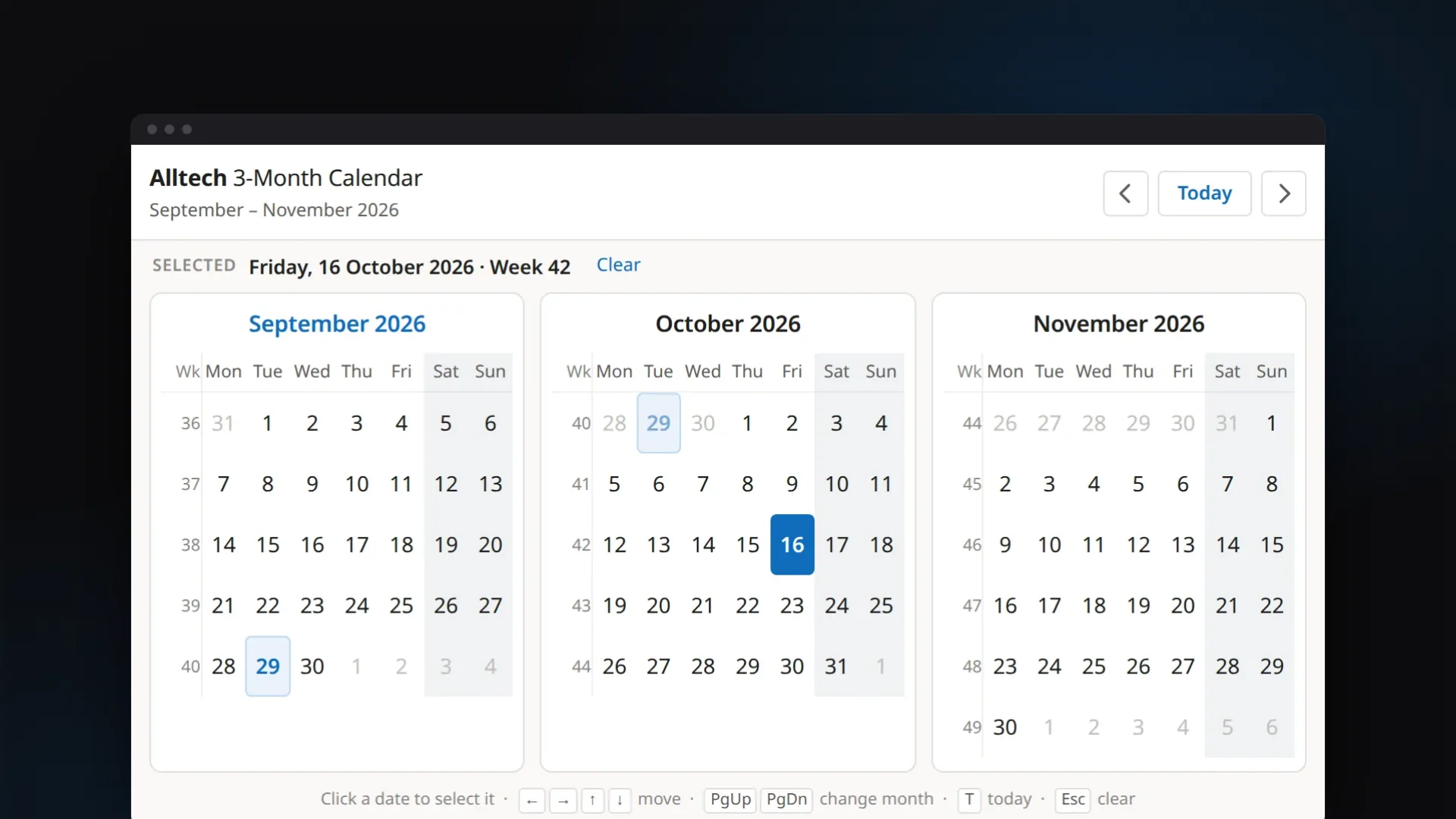
Three months at a glance
The current month and the next two sit side by side, reflowing into two columns, then one, if browser zoom narrows the popup. The arrow buttons, or Page Up and Page Down, roll the whole view a month at a time, and Today brings it back.
ISO week numbers, including week 53
Every row carries its ISO-8601 week number, including week 53 in the years that have one and weeks that straddle the new year. Hovering over a number shows which year the week belongs to.
Laid out for the working week
Weeks start on Monday, and the Saturday and Sunday columns are shaded as one block. Dates from neighbouring months appear faded rather than blank, so every week reads as a complete row.
Any date in plain words
Click a date and the strip above the calendar reads, for example, "Friday, 16 October 2026 · Week 42". The selection stays put when moving between months, and Esc clears it.
Keyboard and screen-reader support
Arrow keys move a day or a week, and the view follows across month and year boundaries. Each date is labelled in full for screen readers, and today and the selected date are flagged to them as well.
Private and permission-free
No permissions, no site access, no stored data and no network calls. Chrome's own details page for the extension confirms that it requires no special permissions.
See it in action.
Screens captured from the working application using fictional demo data.
Front end
How it's built.
The extension works entirely inside the browser. Clicking the toolbar icon makes Chrome open a small page that ships with the extension, and that page works out the three months and draws them. There is no server, no account, no storage and no network traffic, so there is nothing to host or secure beyond the extension itself.
Technically, it is a Manifest V3 action extension with a single popup, split into two plain scripts. calendar-core.js holds the date maths and has no access to the page or to Chrome, so the Node test runner loads exactly the same file the popup does. popup.js owns state, rendering and input, and builds the calendar with createElement rather than HTML strings, so the popup runs under Manifest V3's default content security policy with no exceptions. The toolbar icons are generated from a vector description by a Python script that uses only the standard library.
- Toolbar actionManifest V3 action with 16, 32, 48 and 128 px icons; minimum Chrome 88
- Popup pagepopup.html and popup.css; 786 px wide, under Chrome's 800 x 600 popup cap
- popup.jsState, rendering, navigation, keyboard and focus; calendar built with createElement
- calendar-core.jsPure date maths: Monday-first grids, ISO weeks, formatting; no DOM, no chrome.* APIs
- In-memory state onlyThe selection lasts while the popup is open; no chrome.storage, no permissions, no network
- Icon generatorPython standard library only (zlib and struct); regenerates the four PNGs byte for byte
- node:test suites43 tests: calendar maths plus packaging, CSP and no-network checks
- Playwright end-to-end runLoads the unpacked extension in Chromium and runs 50 checks
Technology
Frontend
- Chrome Manifest V3
- Toolbar action popup
- HTML, CSS and JavaScript
- CSS Grid layout
- Fluent colour palette
- No framework or dependencies
Auth & Security
- No permissions requested
- No host access
- Default Manifest V3 CSP
- No eval or innerHTML
Hosting & DevOps
- Load unpacked (developer mode)
- Python icon generator
Testing & Quality
- node:test (43 tests)
- Playwright (50 checks)
- Tests run in 4 time zones
- Packaging and CSP checks
The hard parts, solved.
- 01
Date maths that survives time zones and clock changes
In some time zones the clocks change at midnight, so on those days midnight does not exist and a date built at midnight can roll onto its neighbour. Every date is built at noon local time and compared by a key made from its local year, month and day, never from UTC. The documented test run repeats the suite under four time zones, including ones whose clocks change at midnight.
- 02
ISO week numbers across the year boundary
ISO week 1 is the week containing the year's first Thursday, so late-December dates can belong to week 1 of the next year and early-January dates to week 52 or 53 of the last. The calculation moves to that week's Thursday before counting. Tests check known boundary dates, confirm the number steps by one across 700 consecutive weeks, and check that all seven days of every row share one week number across 20 years of months.
- 03
Fitting inside Chrome's popup limits
Chrome caps extension popups at 800 by 600 pixels, and a month needs four, five or six rows depending on its length and the weekday it starts on. Each month card reserves six rows so the popup never changes height during navigation, which the browser run confirms across a full year. The width uses 100% rather than 100vw so a scrollbar cannot push the layout sideways, and the months reflow when zoom shrinks the popup.
- 04
Keyboard navigation over a rolling three-month grid
A date can appear twice on screen, as a faded trailing day in one month and as a real day in the next, and the calendar is redrawn on every change. The popup keeps a single tab stop on the in-month copy, moves by whole days so stepping off a month or year lands on the right date, slides the view along when focus leaves it, and puts focus back after each redraw.
- 05
Guarding the privacy promise with tests
The packaging tests read the manifest and source files and fail if a permission, host access, content script, inline script or event handler, eval, innerHTML, remote URL or network API ever appears. They also check that every element, style and calendar function the popup relies on actually exists, catching mistakes that would otherwise only show up after installing the extension.
A complete first version, ready to load into Chrome
Version 1.0.0 is complete for its scope. It installs from its folder with Chrome's Load unpacked, runs without console errors or warnings, passes its unit tests in all four documented time zones and passes the 50-check browser run against the installed extension.
Installation today is from that folder in Chrome's developer mode rather than from the Chrome Web Store. This first version is a visual calendar only, with no Outlook, Google Calendar or Microsoft 365 integration and no events, and keeping to that scope is what lets it run without any permissions.
- UX/UI design
- Browser extension development
- Quality engineering