Kingston Mosque Digital Platform
Website, prayer times, TV screens and Madrasah, all run from one admin
- Platform
- Website
- Mobile App
- PWA
- Client
- Kingston Muslim Association (Kingston Mosque)
- Sector
- Faith & community
- Year
- 2026
- Platforms
- Web · iOS · Android · Smart TV browser
- Stage
- Production-ready
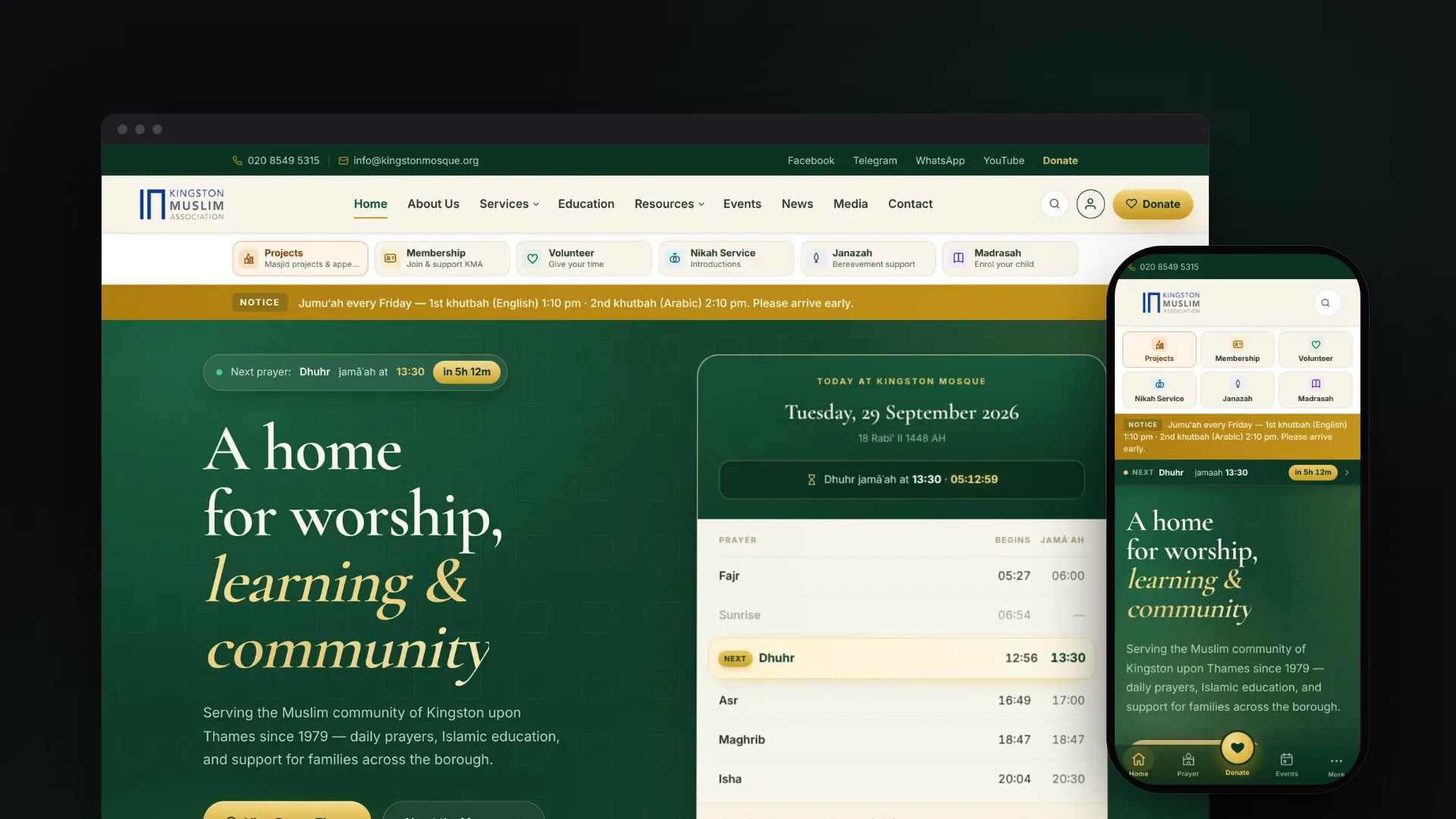
The project at a glance.
Kingston Mosque's digital platform brings together a new public website with live prayer times, full-screen prayer boards for the TVs around the mosque, a Madrasah Management System for admissions, registers, homework and fees, and an iOS and Android app being prepared for release. Staff and volunteers run all of it from one admin without touching code, while parents, teachers and members each have their own sign-in.
- Who it serves
- Worshippers and visitorsToday's begin and jamā'ah times with a live countdown, events, news, Friday khutbahs and simple ways to give.
- ParentsRegister children online, follow each application stage, and see attendance, homework, marks and fees in one portal.
- Teachers and studentsRegisters taken on a phone with one tap per child; weekly lessons and homework that children open at home.
- Office staff and trusteesWorkspaces for admissions, invoicing and compliance, with access limited to what each role needs.
A busy mosque, many services, and volunteers to run them
A community mosque does far more than publish prayer times. Kingston Mosque has five daily prayers whose times change every day of the year, Friday prayers, a Madrasah for children aged 6 to 16, marriage and funeral services, membership, volunteering and fundraising for its own expansion. Each of these needs forms, records, communication and follow-up.
The people who keep it all current are office staff and volunteers, not developers. The mosque's WordPress site was due for a full rebuild, the TVs around the building relied on a separate paid display box, and the Madrasah holds children's records, including health and safeguarding information, which need strict access control and proper data-protection tooling.
An integrated platform that staff and volunteers run themselves
VNE audited the old site, wrote a phased rebuild plan, then designed and built a single Next.js application with Payload CMS inside it. The public website, the admin, the TV screens and the mobile app all read from the same content and the same prayer-times engine, so a change saved in the admin reaches every screen, usually within a minute.
Around the website sits a set of task-based workspaces for the office: Madrasah admissions, students and enrolment, teaching, money and oversight, plus membership, nikah introductions, janazah requests, volunteers and fundraising projects. Each portal user sees only the records that concern them, and children learn through their family's account.
What it does.
Prayer-times engine
The annual 365-day timetable is imported and checked for errors, with day-by-day overrides in a spreadsheet-style editor. A live countdown to the next jamā'ah rolls over to tomorrow's Fajr after Isha.
In-mosque TV screens
Each TV opens its own address and loops a playlist of slides managed in the admin: prayer board, notices, images and QR codes. Screens keep showing the last good board through Wi-Fi drops and ask the browser to keep the display awake.
Madrasah admissions
Applied, received, waiting list, offered, accepted and enrolled, first come, first served within each group. An offer holds a seat against the class's capacity, and accepting it creates the enrolment automatically.
Registers and learning at home
Teachers mark present, late, absent or excused on their phone. A course builder publishes weekly lessons, homework and assessments that children open from home, and Qur'an progress is tracked for each child.
Family invoicing
Monthly invoice runs with a dry-run preview, family fees tiered by number of children, part payments matched to invoices, overpayments held as credit and reminder emails, with every amount stored in whole pence.
Community services
Membership applications and renewals, a mosque-managed nikah introduction service, janazah support requests, volunteer sign-ups, and fundraising projects with campaigns and pledges.
Broadcast and notifications
Write a notice once and send it to app and browser push, email subscribers, Telegram, Facebook and Instagram, with a delivery report for each channel. People can opt in to a reminder 15 minutes before each jamā'ah.
No-code website management
A Website Studio shows the whole site as a tree, with drafts, review and approval, a media library with focal-point cropping, and a Ctrl+K command palette for moving around the admin.
Safeguarding and data protection
Fifteen staff roles, safeguarding notes that general admin and office staff cannot open, an audit log, and built-in tools for subject access requests, retention review and erasure.
See it in action.
Screens captured from the working application using fictional demo data.
How a child joins the Madrasah
- 01
Parent registers online
One family account covers every child, and a home address and two emergency contacts with different phone numbers are required. Registration opens and closes on a schedule the office sets.
- 02
Office reviews the queue
Applications move from received to the waiting list, which is ordered first come, first served within each class group.
- 03
A place is offered
The offer names a class and holds a seat against its capacity, with an expiry date and automatic reminder emails.
- 04
Parent accepts in the portal
Acceptance creates the enrolment, so the child appears on registers, invoices and reports without anyone re-keying it.
- 05
Learning and billing run
Teachers take registers and set homework; parents see attendance, marks and fees; at year end a previewed rollover moves each child up, keeps them in their class or marks them as leaving.
How it's built.
Everything the mosque publishes lives in one place. The website, the TV screens, the installable web app and the native app all ask the same server for the same data, so there is one set of rules for prayer times, notices and events, and nothing to keep in sync by hand. Private areas for parents, teachers, members and staff sit on the same platform, each with its own sign-in and its own limits.
Technically, it is a single Next.js 15 application with Payload CMS 3 running inside it, backed by PostgreSQL in production and SQLite for local work. Payload provides the admin, authentication, drafts and the REST and GraphQL APIs; custom route handlers add an aggregated snapshot feed for the apps and screens, the portal APIs and scheduled housekeeping. Optional integrations such as email, push, Stripe and Mailchimp switch on only when their settings are present.
- Public website and PWANext.js App Router, service worker, offline page
- Mosque TV screensPer-screen slide playlists, cached board, Wake Lock
- iOS and Android appExpo and React Native, reads the snapshot feed
- PortalsParent, teacher, member and nikah sign-ins; children use the family account
- Payload CMS adminCustom workspaces, Website Studio, command palette
- Payload REST and GraphQLGenerated from the collection definitions
- App API route handlersSnapshot feed, portals, search, iCal, cron endpoints
- Prayer-times engineAnnual CSV import, validation, daily overrides
- Madrasah modulesAdmissions, attendance, billing, courseware, GDPR tools
- Community servicesMembership, nikah, janazah, volunteers, projects
- Broadcast and jobsMulti-channel fan-out, scheduled sweeps with run history
- PostgreSQLProduction database; SQLite for local development
- Media storageLocal disk or any S3-compatible bucket
- Audit log and job runsWho changed what, and when each job last ran
- Email and pushSMTP, Web Push (VAPID) and Expo notifications
- Payments and mailing listStripe Checkout and Mailchimp, both optional
- Social channelsTelegram Bot API, Facebook and Instagram
- Hosting and CIRailway, GitHub Actions, Codemagic
Technology
Frontend
- Next.js 15.4
- React 19
- TypeScript 5
- Custom CSS design system
- Progressive web app (service workers)
Mobile
- Expo SDK 52
- React Native 0.76
- Expo Router 4
- Expo Notifications
- React Native Maps
Backend
- Payload CMS 3.85
- Next.js route handlers
- Payload REST and GraphQL
- Lexical rich-text editor
- Node.js 20+
Data
- PostgreSQL
- SQLite (local development)
- Drizzle schema push
- S3-compatible media storage
- Sharp image processing
Integrations & APIs
- SMTP via Nodemailer
- Web Push
- Stripe Checkout
- Mailchimp
- Telegram Bot API
- Meta Graph API
- OpenStreetMap Nominatim and Overpass
- iCalendar feed
Auth & Security
- Payload authentication
- Role-based access (15 staff roles)
- Separate portal accounts
- Login lockout
- CSRF origin allow-list
- Security headers
- Audit log
Hosting & DevOps
- Railway
- GitHub Actions CI
- Scheduled housekeeping workflow
- Codemagic mobile builds
Testing & Quality
- Vitest
- API smoke suites
- Playwright regression scripts
- TypeScript type checking
The hard parts, solved.
- 01
Prayer times that must never be wrong
The mosque supplies a 365-day timetable with daylight-saving changes already applied, so the engine treats every time as London wall-clock time instead of converting it. The importer checks row counts, continuous dates, time formats, the daily order of prayers and jamā'ah outliers, and it caught a slip in the supplied file (one Isha jamā'ah an hour out of line with the days either side) for an admin to confirm. Per-day overrides saved in the admin always win over the annual file.
- 02
Children's records handled with care
Access is split by job: the office runs admissions and registers, safeguarding notes sit behind a dedicated Designated Safeguarding Lead role that general admins and office staff do not have, and management sees aggregate figures without read access to any child's record. The waiting-list export leaves out medical and internal notes, erasure anonymises rather than deletes where financial or safeguarding duties apply, and a draft Data Protection Impact Assessment sets out the decisions left to the trustees.
- 03
Money and places that add up
Invoice runs and lesson generation offer a dry run and are idempotent, so running them twice never double-bills or duplicates a register. Free seats are counted after deducting offers still awaiting a reply, and the year-end rollover is built as preview, commit, safe re-run and undo, with every change stamped with a batch id.
- 04
Schema changes on a live database without migrations
The standard schema push asks for confirmation interactively, which a headless server cannot answer, and one failing statement fails the whole batch. The boot sequence applies the schema without prompts, retries statement by statement if the batch fails, records anything skipped and shows it in the admin, and resynchronises Postgres id sequences so that adding new records cannot fail after a data import or restore.
- 05
Failures that announce themselves
The dashboard raises banners when email cannot leave, when scheduled jobs have gone quiet or when part of the schema did not apply. The scheduled GitHub workflow fails when a job errors or when none of a job's messages could be sent. The spam trap on public forms now flags suspicious submissions for review instead of discarding them, after it was found to be catching real families whose password managers filled the hidden field.
Prepared for the switch from the old WordPress site
The website, admin, TV screens and Madrasah Management System are built, and every change must pass type checks, the unit tests and a production build in CI. The platform is configured for Railway hosting with a managed Postgres database, and the repository documents how to run it: an operations runbook, backup and restore drills, scheduled housekeeping and self-diagnostic endpoints.
Moving the mosque's public web address from the old WordPress site is prepared, with permanent redirects for the old URLs. The iOS and Android app is set up to build through Codemagic for TestFlight and Google Play internal testing, and the website shows it as coming soon.
- Product strategy
- UX/UI design
- Full-stack development
- Mobile development
- DevOps