Demo Local Gym Member App
Members of either Demo Local Gym club plan workouts, log sets and keep their streak going
- Mobile App
- Web App
- Client
- Gym and fitness client (anonymised)
- Sector
- Health & fitness
- Year
- 2026
- Platforms
- iOS · Android
- Stage
- MVP
The project at a glance.
Demo Local Gym is an iPhone and Android app for a multi-club gym, shown here with the fictional Northside and Southside clubs. Members pick their home club to see whether it is open, the current membership offer, the class library and ways to get in touch, and they can plan sessions, log sets against a rest timer and build weekly streaks. All club information comes from one content model that marks unconfirmed details as pending, so the app never presents a guess as fact.
- Who it serves
- MembersTheir club's live open status, a training planner, a workout log with rest timer, and weekly streaks and badges.
- Prospective membersThe confirmed monthly offer, a choice of club, and simple forms to book a tour or enquire about membership or personal training.
- Club managementOne content model with verification flags, plus a written report of every unconfirmed item, so nothing appears in the app as fact until the club has confirmed it.
More than one club, a website and no app
The client, presented here as Demo Local Gym, runs more than one club, and its club information lived on its website. It wanted an app that put opening times, membership, classes, trainers and contact options on members' phones. With one brand across several sites, it is easy for an app to show one club's hours, prices or team to another club's members.
Many details were still being confirmed, including per-club opening hours, class descriptions and most membership prices, and no connection to the membership and booking system had yet been agreed. An app that filled the gaps with guesses would lose members' trust, and one that waited for every fact would not ship.
A content-driven app that is useful from day one
VNE designed and built iPhone and Android apps from one shared interface. Every screen reads from a single structured content model in which each record belongs to a specific club and is flagged as confirmed or pending. Each club's information stays separate, and anything unconfirmed is labelled as such rather than hidden or invented.
So that the app earns its place before any back-end integration, VNE added training tools that work entirely on the phone: a planner that turns a typed plan into equipment and classes, a workout log with a rest timer, and streaks and badges based on the member's own use of the app.
The project also includes a complete delivery pipeline. Tests run before every build, signed builds are uploaded to TestFlight and Google Play internal testing automatically, and a version tag submits a release to both stores.
What it does.
Two clubs, cleanly separated
Members pick their home club on first launch (in this demo, Northside or Southside) and can switch at any time. Membership, facilities, trainers and contact details then show only that club's information, and a further club can be added as one more data record.
Live open-now status
Whatever timezone the phone is set to, the app works out from the London clock whether the club is open, when last entry is and when it next opens. Special closures and bank-holiday hours are held as data alongside the weekly pattern.
Training planner
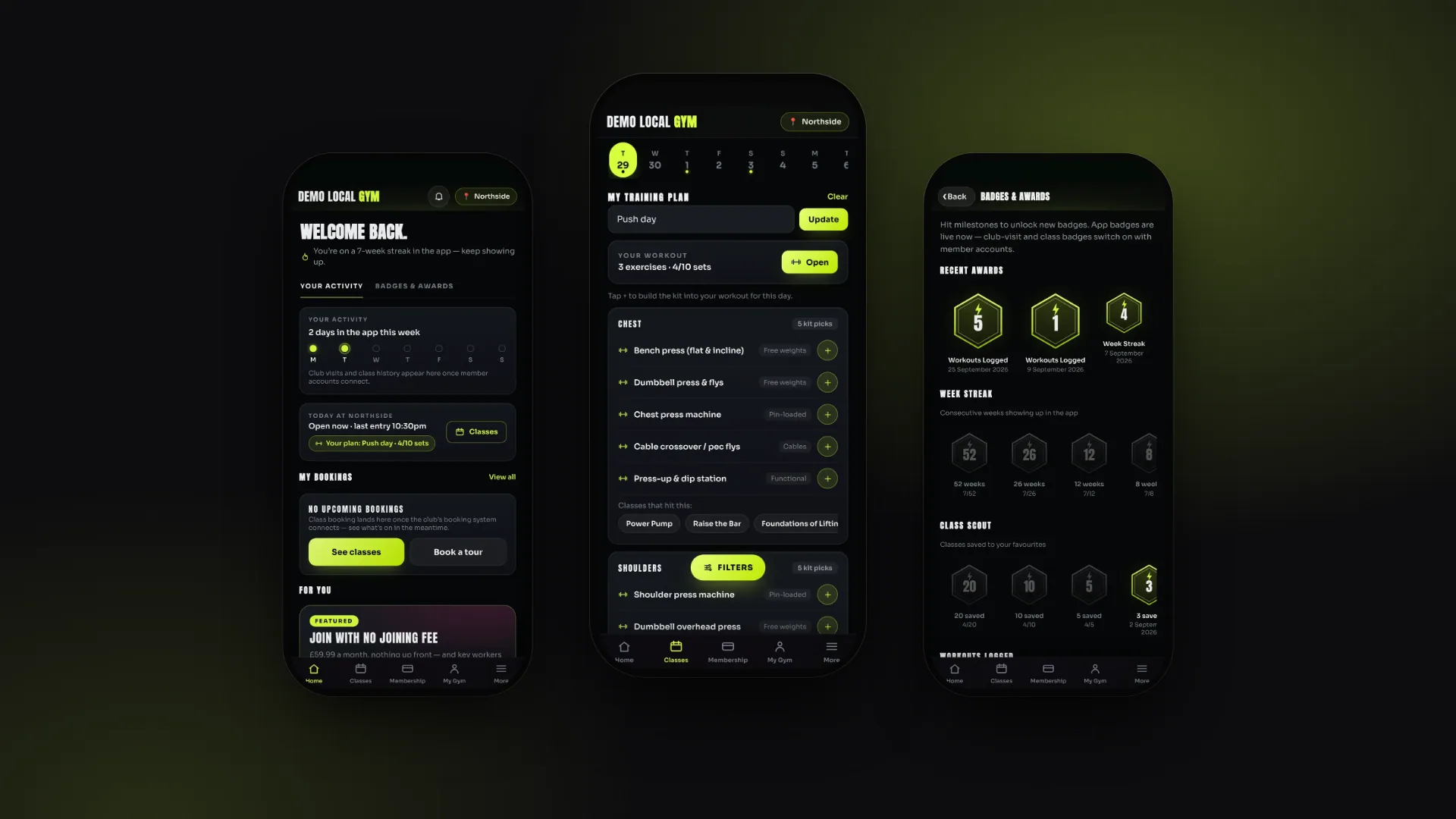
Members type a plan for a day, such as "legs + core" or "push day", and the app lists typical equipment and relevant classes for each muscle group. It covers 12 muscle groups and expands shorthand such as push, pull, upper and lower into several.
Workout builder and rest timer
One tap adds equipment to the day's workout. Members set a target number of sets, log the reps completed for each, and logging a set starts a rest timer that picks up where it left off if the app is closed.
Streaks and badges
Weekly streaks, saved classes and finished workouts unlock tiered badges. Badge families for club visits, classes attended and membership anniversaries stay locked until the app connects to member accounts, so no attendance figures are made up.
Membership and offers
The confirmed monthly plan is shown with its benefits and key worker discount, while plans without a confirmed price say so. Until the sign-up link is connected, members are directed to an enquiry form or the club; once it is, a "Leaving Demo Local Gym" notice appears before the provider's page opens.
Enquiry forms with reference numbers
Four forms cover tour bookings, personal-training and membership enquiries, and general contact. They validate entries, block duplicate submissions and issue a reference number, and the confirmation explains that the enquiry is held on the phone until a submission service is connected.
Everything stays on the phone
Club choice, favourites, plans and workout logs are stored only on the phone. The app contains no analytics, tracking or third-party data SDKs and makes no network calls of its own.
Native feel on both platforms
Screens slide in and out as they do in native apps, and members can swipe from the edge to go back. Haptic feedback, the splash screen, a themed status bar and the Android back button are all handled.
See it in action.
Screens captured from the working application using fictional demo data.
Front end
How a member plans and logs a workout
- 01
Choose a club
On first launch the member picks a home club, and every screen then shows that club's information and live open status.
- 02
Type a plan
On the timetable's day strip the member types what they are training today or on any of the next seven days, and a dot marks each planned day.
- 03
Build the workout
The planner turns the plan into muscle groups with typical equipment and matching classes, and the member taps + to add exercises.
- 04
Log sets and rest
Each logged set records the reps completed and starts the rest timer.
- 05
Finish and earn
Finishing the workout counts towards the Workouts Logged badges, and the home screen shows the week's activity and current streak.
How it's built.
The app is a single interface built with standard web technology and packaged inside thin iPhone and Android app shells. All club facts come from one structured content file, and everything personal to the member stays on the phone. The content file has the same shape as the planned CMS and API, so it can be replaced by a live service without redesigning the screens.
Technically, Capacitor 6 hosts a self-contained www/ bundle with no framework, bundler or CDN, split into a content model, runtime, UI kit, screens and a boot script. The runtime provides a stack router with push and pop transitions and edge-swipe back, the open-now engine, the activity and badge engine and the planner's keyword matcher, with state saved to localStorage. Codemagic is configured to test, build, sign and upload both platforms.
- iOS appCapacitor 6 shell, iPhone only, iOS 13+
- Android appCapacitor 6 shell, min SDK 22, target SDK 34
- Capacitor pluginsApp lifecycle and back button, haptics, splash screen, status bar
- Screens32 registered views: home, classes, workout, badges, membership, forms and more
- RuntimeStack router, edge-swipe back, open-now engine, activity and badge engine, planner matcher
- UI kit and design tokensCards, hex badges, sheets, forms; 38-icon SVG set; embedded Anton and Sora fonts
- Content modelClubs, plans, classes, facilities, legal documents and badges with stable IDs and verification flags
- On-device statelocalStorage: club, favourites, plans, workouts, badges and rest timer
- Automated tests29 node:test checks run at the start of every CI build
- Codemagic CI/CD6 workflows: unsigned development builds, signed test-track uploads and tag-triggered store releases
- AppleSigned builds to TestFlight; App Store submission with manual release
- Google PlaySigned AAB to internal testing; production set to a 20% staged rollout
Technology
Frontend
- Plain JavaScript (no framework)
- HTML and CSS with design tokens
- Inline SVG icon set
- Anton and Sora (embedded fonts)
Mobile
- Capacitor 6 (iOS and Android)
- Capacitor plugins
- Xcode project (iPhone, iOS 13+)
- Android Gradle (min SDK 22, target 34)
Data
- Structured, CMS-ready content model
- localStorage (on-device state)
Auth & Security
- No runtime secrets or API keys
- Signing credentials held only in CI
- "No data collected" privacy position
Hosting & DevOps
- Codemagic CI/CD
- App Store Connect and TestFlight
- Google Play (internal and production)
- CI-generated build numbers
Testing & Quality
- Node.js test runner (node:test)
- Content-integrity tests
- Planner, activity and smoke tests
- Credential-file scan
The hard parts, solved.
- 01
Building before every club fact is confirmed
Many club details were still awaiting confirmation when the app was built. Every record therefore carries a stable ID, its club, its source and a verified flag, and the screens show pending labels or clear empty states instead of guesses. Automated tests enforce this: any price must be verified, the class timetable starts empty, the home-screen offer must be verified, and club records never appear under the other club.
- 02
Open or closed, in London time, on any phone
A phone set to another timezone would otherwise show the wrong status. The engine uses the Intl API to read the current Europe/London date and time, then applies the right hours: a special opening or closure first, then bank-holiday hours on listed dates, then the regular weekly pattern. From the same data it works out the last entry time and when the club next opens.
- 03
Streaks that do not break by mistake
iPhone apps usually resume from the background rather than starting afresh, so counting launches alone would miss days of use and break streaks. The app also records activity when it becomes visible again and on Capacitor's app-state event. Streaks are counted in Monday-to-Sunday weeks, each badge is dated when the phone first records the milestone, and the rest timer stores its end time so it survives a restart and clears quietly if it ran out while the app was closed.
- 04
Free-text planning without a server
The planner matches whole words in whatever the member types against keyword lists for 12 muscle groups, and shorthand such as push, pull, upper, lower and arms expands to several groups. Tests check that a keyword inside a longer word, such as "back" in "setback", does not trigger a match, and that every suggested class exists in the class library.
- 05
One codebase, two stores, no secrets in the repository
iOS and Android run the same www/ interface, and the Android back button, status bar and splash screen are handled from that shared code through Capacitor plugins, so the native projects stay stock. Six Codemagic workflows run the tests, then produce unsigned development builds, signed TestFlight and Google Play testing builds, or tag-triggered store submissions. Signing files are excluded by .gitignore, and a test fails if one is ever committed.
Version 1.0, with six releases sent to TestFlight
Version 1.0.0 of the Demo Local Gym app is complete as an MVP with 32 screens for iPhone and Android. The project history records six releases sent to TestFlight through the automated pipeline, and the Android project, Google Play listing assets and release workflows are in place.
Before public release, the project's release checklist requires the client to confirm the remaining club content, including per-club hours, class details, trainer profiles and legal wording. Because the content model already matches the documented API and CMS plan, class booking, member accounts and push notifications can be added without redesigning the app.
- Product strategy
- UX/UI design
- Mobile development
- Data modelling
- DevOps