Iris Portrait Studio
Print-ready iris portraits from an eye photo, with every colour measured, not invented
- Mobile App
- Web App
- AI
- Client
- Private client
- Sector
- Creative & print
- Year
- 2026
- Platforms
- Android · Web
- Stage
- Prototype
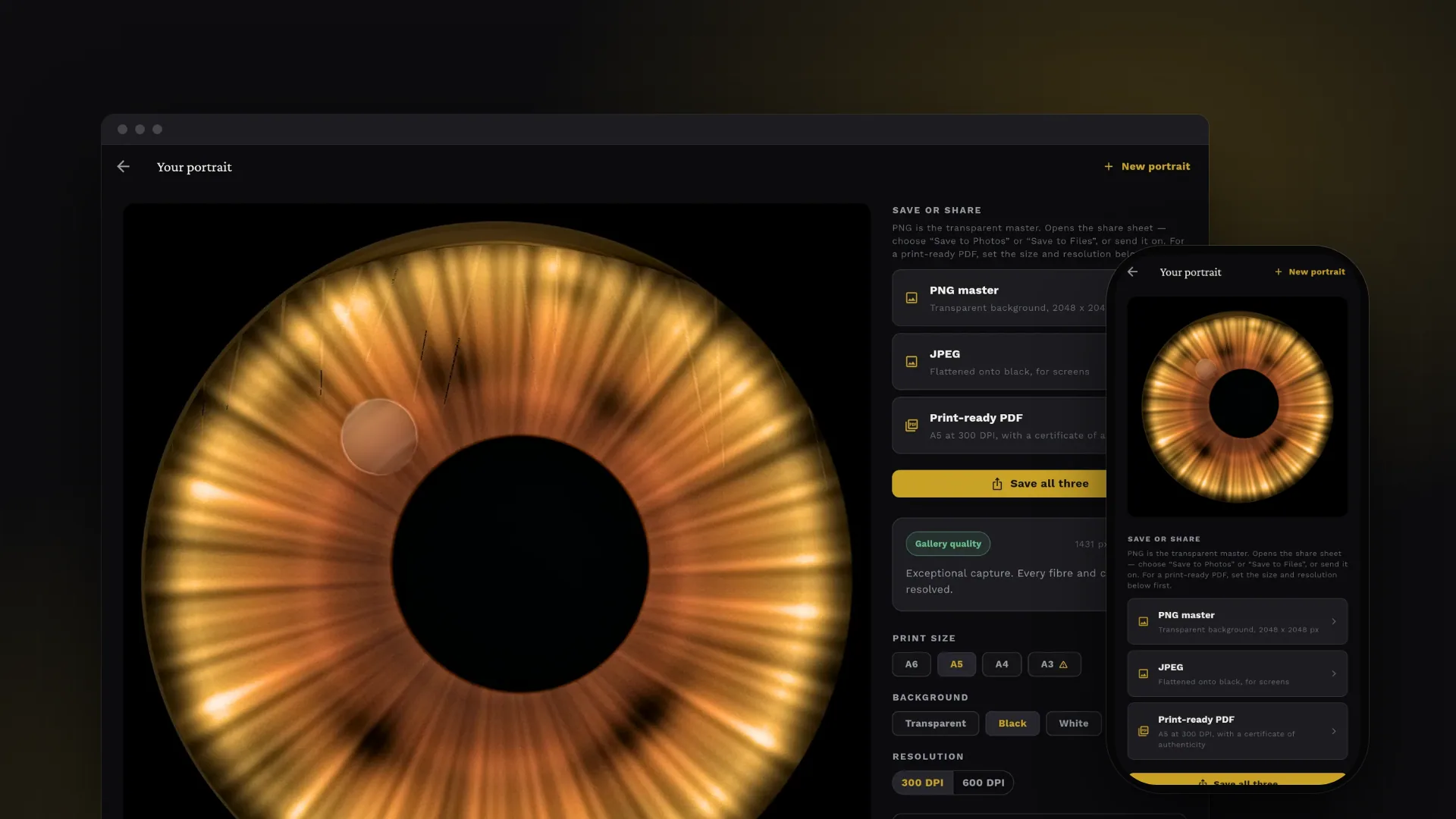
The project at a glance.
Iris Portrait Studio turns a photograph of an eye into a gallery-style iris portrait: a perfect circle of the iris with the eyelids and lashes taken out, ready to print. Built for iris-portrait studios and their customers, it promises that every colour in the artwork comes from the customer's own eye and none is invented. The photo is processed on the customer's phone or in their browser, and nothing is uploaded.
- Who it serves
- CustomersA portrait of their own eye, processed privately on their phone or in the browser, with a clear explanation of what their photo can support.
- Iris-portrait studiosConsistent, repeatable print masters without hand retouching, and a record of how each piece was produced.
- Print productionPrint-ready PDFs at exact A6 to A3 page sizes, at 300 or 600 DPI, plus a transparent PNG master for any background.
Iris art takes skilled retouching, and shortcuts invent detail
Iris portraits are a personalised print product. The polished look customers expect normally comes from a skilled retoucher who masks the iris, removes lashes and reflections and lifts the detail by hand. The project's own analysis of the reference artwork puts that at 45 to 120 minutes of expert work per image.
Automating it has two traps. Generative AI tools re-synthesise texture and shift hue, so the print is no longer the customer's eye. And the photo sets a hard ceiling: an A5 print at 300 DPI needs roughly 1,500 pixels of real iris detail, while a casual phone snapshot carries about 300, so selling a large print from one means selling a soft print and inviting a refund. An iris photo is also biometric data under GDPR Article 9, so where it is processed matters.
Measure, repair and be honest about what each photo can print
Starting from a technical strategy written before any code, VNE designed and built a single Flutter app for Android and the web. It takes the customer through five steps: capture, frame, confirm the detected iris, render and save. Detection, repair, enhancement and colour analysis are plain Dart code running on the customer's own device, with no account, no upload and no API key.
Tone, contrast and detail are adjusted on lightness only. The only steps allowed to touch colour are a white-balance correction taken from the white of the eye and two bounded controls that hold hue fixed. Lashes and reflections are rebuilt from the same eye a few degrees away, and the app states how much it rebuilt. It measures how much real detail the photo carries, warns before a chosen print size would come out soft, and every PDF includes a certificate recording how the portrait was made.
What it does.
Capture at full resolution
Customers take a photo or upload one at full camera resolution, because the detail captured sets the ceiling on print size. The first screen coaches them to get close, light from the side and keep the eye open.
Guided framing
A pinch-and-drag square with a guide ring points detection at the eye, and asks for a little of the white of the eye, which the app uses to correct the camera's colour cast.
Automatic iris detection, easy to correct
The pupil and iris edges are found automatically and drawn over the photo with a confidence score. Either ring can be resized, or the centre moved, in a few taps.
Lash, lid and reflection repair
Anything that is not iris is flagged and rebuilt from the same distance out on the same eye, so the repair borrows the customer's own tissue rather than inventing it. The app reports how much of the iris was rebuilt.
Colour kept true to the eye
Detail and contrast are lifted on lightness only, white balance is taken from the white of the eye, and automated tests fail if hue or chroma drift beyond set limits.
Honest print sizing
The app grades the photo, reports how many pixels of real detail it carries and warns in plain English when a chosen size would print soft, recommending the largest size it can support.
Measured palette and iris insights
Up to six named colours with their share of the iris, plus observations on rings, flecks, the collarette and radial structure, written as aesthetic notes with no health claims.
Print-ready deliverables
A 2,048 px PNG master with a transparent background, a JPEG, and a PDF at exact A6 to A3 page sizes with a certificate of authenticity. On Android, files are handed to the system share sheet so they can be saved to Photos or Files.
On-device by default
The photograph is processed on the device and never uploaded, and the optional AI layer stays off unless a studio connects its own gateway. The web build serves its rendering engine and brand typefaces from its own origin.
See it in action.
Screens captured from the working app, run locally from its Flutter codebase, using the synthetic test eye from the repository's own test suite. The technical view comes from the repository's headless render tool.
How an eye photo turns into a portrait
- 01
Photograph
Take a photo with the camera or upload one, following three short capture tips.
- 02
Frame the eye
Pinch and drag so the iris fills the square, or use the whole image.
- 03
Check the boundaries
Confirm the detected iris and pupil rings, or nudge them into place.
- 04
Create the portrait
The app corrects white balance, repairs lashes and reflections, lifts detail on lightness only and composes a perfect circle.
- 05
Save or print
Pick a print size the photo can support and a background, then save the PNG, JPEG and print-ready PDF.
How it's built.
All processing happens on the customer's phone or in their browser: there is no server and no database. The app is one Flutter codebase, and its image-processing engine is plain Dart with no Flutter or platform dependencies, so exactly the same engine runs on Android, on the web and inside the automated tests.
Technically, it follows a three-layer clean architecture (domain, data, presentation) with a single get_it composition root. The photo is converted to CIELAB and the pupil and limbus are located; the pipeline then corrects white balance from the sclera, resamples the iris into polar (angle by radius) space, finds and repairs occlusions, enhances lightness, applies the hue-locked colour controls, composes a circular RGBA master at a working size the capture can support and, where needed, enlarges it once with Lanczos resampling. An optional AI layer defines six capabilities behind a provider registry, and providers must call the studio's own gateway rather than a vendor. In this version only two are consulted: a learned segmenter may refine a low-confidence detection, and a language model may write the insight copy from measured numbers. A tested fidelity guard is ready for any future step that changes pixels.
- Android appFlutter; camera and gallery via image_picker; exports via the system share sheet
- Web appFlutter web; CanvasKit and brand fonts served from the app's own origin
- Stage routerFour screens derived from workflow state rather than URLs
- Studio controllerRiverpod state driving detection, render and export
- Composition rootget_it wires interfaces to implementations in one file
- Iris detectorClassical, deterministic: pupil seed plus Daugman integro-differential limbus search
- Polar rectifierCatmull-Rom sampling into angle by radius; ellipses become circles
- Occlusion repairPer-radius scoring; repair along the angle at fixed radius
- Colour-safe enhancementSclera white balance; multi-scale detail on L* only; hue-locked colour controls
- Capture quality meterEffective iris pixels discounted by sharpness; print-size check
- Colour analyserk-means++ in CIELAB, named via a curated iris lexicon
- Insight writerAesthetic observations from measured features; no health claims
- Export enginePNG, JPEG and PDF with certificate, via the image and pdf packages
- Provider registrySix capabilities; anything unclaimed falls back to the local engine
- Gateway providerPresets for OpenAI, Anthropic, Replicate, diffusion and custom segmenters
- Fidelity guardTested checks for hue shift, colour drift and reinvented structure, ready for pixel-changing steps
Technology
Frontend
- Flutter web
- Self-hosted CanvasKit
- Material 3 dark theme
- flutter_riverpod 2.6
- get_it 8
- Crimson Pro, Work Sans (OFL)
Mobile
- Flutter (Dart 3.12)
- Android
- image_picker 1.1
- share_plus 10.1
- path_provider 2.1
AI & ML
- Pure-Dart computer vision
- Daugman limbus search
- k-means++ in CIELAB
- Optional AI provider registry
- Fidelity guard for AI output
Integrations & APIs
- image 4.5 (codecs)
- pdf 3.11 (print PDFs)
- http 1.3 (AI gateway)
- JSON gateway wire format
Auth & Security
- On-device processing
- No provider keys in client
- Documented CSP, COOP/COEP
Hosting & DevOps
- Codemagic CI (debug APK)
- Prepared test, Play and web workflows
- Static web build
Testing & Quality
- flutter_test (49 tests)
- Synthetic ground-truth eye
- flutter_lints 6
- Headless render tools
The hard parts, solved.
- 01
Colour the enhancement stages cannot touch
All tone, contrast and sharpening work runs on the CIELAB lightness channel, and the colour channels are separate buffers the detail stage is never handed. The only steps allowed to touch colour are white balance from the sclera and two bounded controls that scale intensity or separation with the hue held fixed. Tests assert that hue moves by less than 2 degrees under the strongest preset, that chroma stays within 10%, and that the intensity control stays within its 1.25x ceiling.
- 02
Telling lashes and eyelids apart from real iris structure
Dark crypts are real tissue that must survive, while eyelid skin over a brown iris is only about 20 degrees away in hue. The occlusion analyser scores each sample against the statistics of its own radius, uses chroma per unit of lightness, finds lashes by morphological thinness and thresholds at two scales. Tightening the mask cut the share of the iris being rebuilt on a real development photograph from 30.2% to 10.8%, as recorded in the commit history, so far more of the artwork is measured tissue rather than interpolation.
- 03
Doing the hard maths in polar space
Resampling the iris into an angle by radius buffer turns several difficult problems into simple ones. Sharpening the radial fibres becomes a choice of axis, repairing a lash means interpolating along the angle at a fixed radius, and an off-axis, elliptical iris is straightened into a circle as part of the resampling.
- 04
Fast enough in pure Dart on a phone
Keeping the engine in plain Dart made it portable and testable, but the project's own analysis expects pure Dart to run roughly 3 to 8 times slower than native OpenCV for this kind of filtering. VNE replaced a quadratic morphology filter with the van Herk/Gil-Werman method (checked identical to the naive version across 152 configurations), turned the mask growth into a breadth-first fill and estimated each ring's statistics from a sample instead of sorting all of it; the commit history records a high-resolution render falling from 37.9 s to 14.6 s. On Android, detection and rendering also run on a background isolate, so the screen stays responsive while they work.
- 05
Letting AI in without letting it invent
The AI layer is designed so a model can help without being trusted. Provider keys stay on the studio's own gateway, a learned segmenter's answer is only used when it is more confident than the built-in detector, and insight narration receives measured numbers rather than the photograph, with its reply length-limited and stripped of any colour swatch that was not measured. For future pixel-changing steps such as restoration or upscaling, a fidelity guard already compares a result with its input for hue shift, colour difference and structure drift, and tests confirm it rejects both a hue shift and reinvented structure.
A tested prototype, with its next steps mapped
The app runs end to end in the browser today, from a photo to a finished portrait, measured palette, insights and print-ready files, and Codemagic is configured to build an installable Android test app from the same code. Its 49 automated tests cover detection accuracy, colour fidelity, repair quality, composition, print-size checks, insight wording and the AI guard, and all pass.
It is a prototype: there is no public deployment, and the consent, retention and privacy-policy work listed below must be completed before it is sold. Development has continued since the version shown here. A second version, since merged into the repository, rebuilds the flow around a live photo check and adds on-device detail restoration with a compact super-resolution model, anchored to the photograph and disclosed on the certificate.
- Product strategy
- UX/UI design
- Mobile development
- AI engineering
- Computer vision