Demo Local Gym Reformer Studio
Reformer Pilates booking where members choose their machine and the owner sets the rules
- Website
- Web App
- PWA
- Client
- Gym and fitness client (anonymised)
- Sector
- Health & fitness
- Year
- 2026
- Platforms
- Web · Installable PWA
- Stage
- MVP
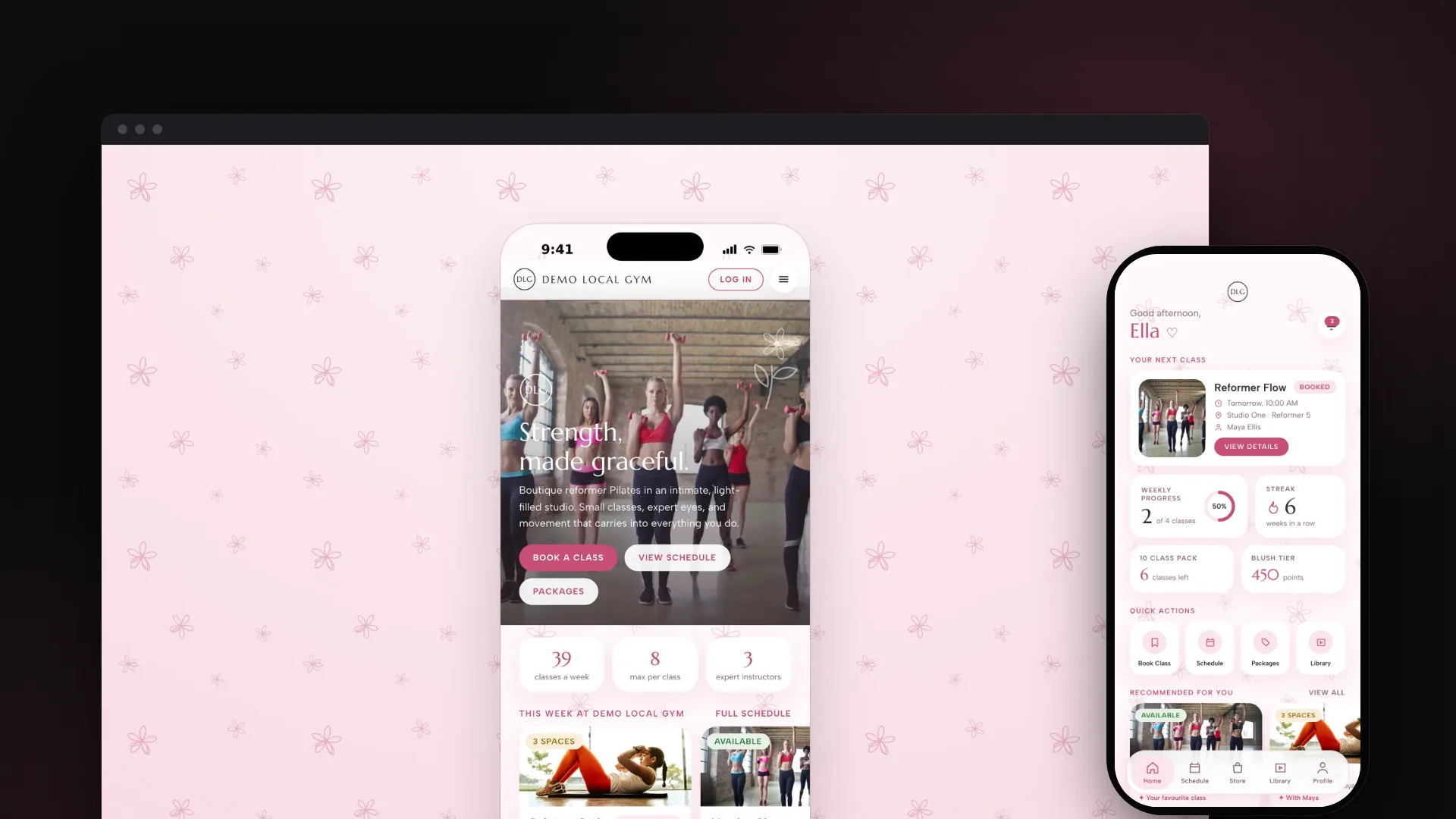
The project at a glance.
Demo Local Gym Reformer Studio is the website and member app for a boutique reformer Pilates studio, shown here under the fictional Demo Local Gym name. Visitors can browse classes, instructors, packages, courses and the shop without an account, while members book a class, choose their own reformer, manage their credits and track their progress. The studio runs its timetable, attendance, booking rules and content from its own admin area, and the whole thing installs on a phone like an app.
- Who it serves
- Visitors and prospective membersBrowse the studio without signing up, then join and land back where they left off.
- MembersBook a class and their preferred reformer, manage credits and memberships, follow technique guides and see their progress, rewards and challenges.
- Studio owner and front deskRun the timetable, attendance, member credits, payment records, booking rules, loyalty and website content from one admin area.
Small classes, limited machines and a lot to keep track of
A boutique reformer Pilates studio sells a small number of places on a fixed number of machines. Every class has its own capacity, members care about which reformer they get, and when someone cancels late or a class fills up, the studio needs clear, consistent rules for refunding credits and deciding who gets the next space.
Around the timetable, the studio also sells class packs, monthly memberships, multi-week courses and retail items, wants loyalty rewards and challenges that keep members coming back, and needs a public website that turns visitors into members. The owner also wanted to set the booking rules directly.
All of it had to live in one branded experience, in the studio's baby-pink palette with floral motifs: a website anyone can browse, an app members want to open, and a back office the owner controls.
A branded app for visitors, members and the front desk
VNE designed and built a single app that works in two modes. Without an account it is the studio's website, with the timetable, instructors, packages, courses, shop, about and contact pages. After sign-in it becomes a personal member app. A visitor who taps Book or Buy is asked to sign in or register, then taken straight back to that class, course or product.
Underneath sits a booking engine that handles live availability, reformer allocation, booking windows, cancellation deadlines, credit refunds and automatic waiting-list promotion. The owner sets booking rules, loyalty points, prices and content in a role-gated Studio CMS, and every admin change is written to an audit log.
Personalisation is deliberately rule-based rather than AI-driven. Each recommended class shows why it was picked, such as 'Your favourite class', and badges and the wellness score follow fixed rules the studio can explain to members.
What it does.
Live timetable
A two-week schedule with a live status on every class (available, limited, almost full, fully booked), search, filters by instructor, level and focus, and calendar export for booked classes.
Reformer choice on a studio map
An interactive map of each studio shows free, taken and out-of-service reformers. Members pick their machine when booking, can switch to another before the cut-off, and can save a favourite.
Waiting lists and fair cancellations
When a place opens in a full class, the waiting list books the next member in automatically. Cancelling before the studio's deadline returns the class credit, and reminders say how long is left to cancel.
Packs, memberships, courses and shop
Class packs with credits and expiry dates, a new-member intro offer, an unlimited monthly membership recorded as a Direct Debit, multi-week courses with limited places, and a shop where members reserve online and pay on collection. Checkout records each sale; collecting card and Direct Debit payments comes next.
Exercise library
Technique, mobility, recovery and breathing guides, each broken down into starting position, movement, breathing, common mistakes, safety and modifications, with search, filters, favourites and completion tracking.
Progress, wellness and journey
Attendance analytics, weekly streaks and badges, a daily wellness check-in with a fixed-formula score, and a private journey of goals, body measurements and progress photos that other members never see.
Rewards and challenges
Points for booking, attending, buying, referring friends and reaching goals, three loyalty tiers and redeemable rewards. Studio challenges track progress from attendance and show leaderboards that members can opt out of.
Membership card and notifications
A wallet-style digital membership card with a check-in QR code and a self check-in that records attendance on arrival, plus in-app and web push notifications for bookings, waiting lists, reminders and rewards, with per-category preferences.
Studio CMS
A role-gated admin area with a live overview, today's classes and attendance, payment records, member credit adjustments, booking rules, loyalty points, announcements, and content managers for classes, sessions, instructors, packages, the library, the shop and more.
See it in action.
Screens captured from the working application using fictional demo data.
How a visitor joins, books and checks in
- 01
Browse as a guest
Anyone can explore the timetable, instructors, packages, courses and shop, and preview the exercise library, without creating an account.
- 02
Join and choose a package
Registering, optionally with a friend's referral code, creates a membership number and rewards the friend with points. Members then choose an intro offer, class pack or monthly membership.
- 03
Book a class and a reformer
Members book within the studio's booking window, choose a free reformer on the studio map, add the class to their calendar, or join the waiting list if it is full.
- 04
Check in at the studio
A self check-in from the digital membership card, standing in for a front-desk scanner, records attendance, awards points and updates badges and challenges. The front desk can also mark attendance in the CMS.
- 05
Track progress and earn rewards
Attendance feeds streaks, badges, challenges and the progress dashboard, and points can be redeemed for studio rewards.
How it's built.
The whole product runs as one small service. The same server delivers the website and app to the browser and answers the app's requests for data, which it keeps in a single database file. That keeps hosting simple: the README documents running it as one Railway service with a persistent volume for the database and uploaded photos.
Technically, it is a React 18 single-page app built with Vite and routed with React Router into public, member-only and admin areas. An Express 5 API with 83 endpoints sits behind it, using Node's built-in SQLite driver (40 tables, WAL mode, foreign keys enforced). Sessions use HttpOnly cookies backed by a token table, with scrypt-hashed passwords. A service worker caches the app shell and static assets so the installed app still opens during a brief connection drop, but it never caches API data, so availability and private information are always live.
- Public websiteGuest browsing of timetable, instructors, packages, courses and shop
- Member appInstallable PWA with a web app manifest and service worker
- Studio CMSRole-gated /admin area in the same React app
- Express 5 API83 endpoints: 81 in 7 route modules, plus health and uploads
- Session authHttpOnly cookie sessions, scrypt hashes, rate-limited auth routes
- Static hostingBuilt SPA served by the same process with deep-link fallback
- Booking engineAvailability, reformer allocation, cut-offs, credits, waitlist promotion
- Rules and rewardsPoint rules, tiers, badges, challenges, recommendations
- CommercePacks, Direct Debit records, courses, reserve-and-collect orders
- NotificationsIn-app and web push, reminder sweep every 10 minutes
- SQLite (node:sqlite)40 tables, WAL mode, foreign keys, demo studio seeded on first boot
- UploadsProfile and progress photos on the data volume, sign-in required
- Audit logEvery CMS create, update, delete, attendance change and credit adjustment
- Web PushBrowser push services, VAPID keys generated on first run
- RailwayDocumented deployment: one Node service, volume set via DATA_DIR
Technology
Frontend
- React 18
- React Router 7
- Vite 5
- CSS variables theme
- Self-hosted web fonts
Backend
- Node.js 22.5+
- Express 5
Data
- SQLite (built-in node:sqlite)
- WAL journal mode
- Foreign keys and indexes
Integrations & APIs
- Web Push (web-push, VAPID)
- QR code generation (qrcode)
- iCalendar (.ics) export
Auth & Security
- HttpOnly, SameSite cookie sessions
- scrypt password hashing
- Rate-limited sign-in routes
- Role-gated admin API
- Private progress photos
Hosting & DevOps
- Railway (documented deployment)
- Persistent volume for data
- Health-check endpoint
- Web app manifest and service worker
The hard parts, solved.
- 01
Fair booking when places are scarce
A booking has to pass several checks in order: the class has not started, the book-by cut-off and booking window allow it, the member is not already booked, a place is free, the chosen reformer is in that studio and not in maintenance, and the member has a valid credit. Credit use and the booking are written in one transaction. When someone cancels, the waiting list books the next member who has credits and tells anyone without credits to top up.
- 02
One app for two audiences
The public website and the member app share the same routes and screens. Public endpoints run through middleware that personalises the response only when a session exists, so member-only fields never reach guests. Library guides return just the first step to guests, and a guest who taps Book or Buy is sent to sign in and returned to the exact class, course or product afterwards.
- 03
Removing a native dependency to fix a hosting crash
The first backend used a native SQLite package that crashed in the hosting platform's runtime. VNE replaced it with the SQLite driver built into Node.js, which needs no compiled binaries, wrote a small transaction helper because the built-in driver lacks one, and added fatal-error logging and a health endpoint so deploy problems show up in the platform logs.
- 04
Booking rules the owner controls
How far ahead members can book, the cancellation deadline and when reminders go out are stored as settings the owner edits in the CMS, with defaults of 14 days, 12 hours and 24 hours. Availability calculations read these values, classes further ahead show when booking opens, and reminder notifications spell out how long the member still has to cancel for a refund.
- 05
Privacy in a social product
Leaderboards show only a first name and surname initial, and members can switch to appearing as a private member. Progress photos are served only to their owner and studio admins. Members can download their data as JSON or delete their account, which in one transaction anonymises their record and removes their sessions, push subscriptions and progress photos.
Website, app and CMS built, with live payments still to connect
The public website, the installable member app and the Studio CMS are built and work together as one service, giving the studio one place to sell, book, check in and keep members engaged, under rules the owner controls. A fresh install seeds itself with a realistic demo studio, and the README documents deployment to Railway with a persistent volume.
It is at MVP stage and has not yet launched publicly. Purchases, course places and Direct Debit mandates are recorded, but no money is collected until a payment provider is connected. Password reset codes are shown on screen because no email service is configured yet, and check-in is a self check-in standing in for a front-desk scanner. No automated tests are committed to the repository.
- UX/UI design
- Full-stack development
- Data modelling
- DevOps